Here is a video tutorial that demonstrates Hard Light Vs. Soft Light I found at Learnmyshot.com
Sometimes there are interesting places that are in the middle of your neighborhood or maybe right in your own backyard.
This little park I found between the Library and the Post Office is for the most part left to fend for itself. A carpet of pine needles blankets the ground and pinecones are left to fall where they may. That is what I like most about this place as most everything else around here is manicured to perfection. But, is not the way of nature in and of itself perfection enough?
The fern-lined path on a cool fall day in Florida provides relief from the constant heat and makes for a pleasant walk. I felt thankful that I did not have to continually wipe the sweat from my face as I looked through the viewfinder.
As I walked observing the nature around me, I slowed down long enough to notice the…
View original post 43 more words
Hi LCC members,
You may be frustrated with learning how your camera works and setting the Aperture (AV), Shutter Speed (TV) or ISO and not sure what they do to an image. These were discused in previous posts here are the links in case you missed it.
And the Holy Grail of Photography the Exposure Triangle
Here is a good ebook by Anderw S Gibson Mastering Photography: A Beginner’s Guide to Using Digital Cameras covers the basics of using your camera. I have read myself, it is easy to understand without double speak and complicated terms.
Ok, your beyond the basics and have mastered your camera settings but your feeling like the well of creativity has run dry. I to get into a place where inspiration has gone on holiday. The best cure for that is to find some photography books with new techniques or simply have material your interested in learning.
Here are a few e-books I have recently discovered and recommend for expanding your photographic vision.
The Visual Imagination by David duChemin
Book Description
Ideas and Techniques for Creative Photographic Expression
Let your camera and your creativity out of the box! Our cameras do amazing things, but since the beginnings of this craft, we’ve leaned heavily towards illustrative and literal interpretations of the world around us. Freed from the need to be so literal, we can create photographs that are beautifully expressive.
The Visual Imagination, Ideas & Techniques for Creative Photographic Expression is about that expression. Whether you want to make abstract or impressionist photographs or just need a bit of a break, this eBook has been written to help you explore the possibilities of the camera when we allow ourselves to slip out from under the thumb of the rules and the constraining ideals of so-called technical perfection. It wasn’t that long ago that painters freed themselves from a similar constraint and gave us the gift of Impressionism and the subsequent movements.
DRAWING THE EYE by David duChemin
Creating Stronger Images Through Visual Mass
E-Book Description
Drawing The Eye is about understanding and using the ways in which the eye reads a photograph in order to create more powerful images, and it’ll change the way you look at your craft. Broken into 4 parts, Drawing The Eye looks at this concept of visual mass, or visual pull, in Concept, in Camera, in Post-processing, and then through Creative Exercises related to each of these sections.
Don’t let the egghead title fool you, this is not academia; it’s a real-world discussion about making images that are more powerful because they’re made with a fuller understanding of where the eye moves in an image, and how that understanding can change the way you shoot and process your images.
BOKEH: CREATING WITH SHALLOW DEPTHS EBOOK BY CHRISTOPHER O’DONNELL
E-Book Description
Bokeh: Creating with Shallow Depths is an eBook written to inspire photographers to think beyond the confines of a deep depth of field. It’s focused on guiding landscape photographers of all levels to widen their aperture and see the environment as light and shapes, and to create abstract, ethereal images that have a deeper meaning and interpretation.
By using a shallow depth of field and thin slices of focus, you can completely transform a landscape, manipulating an environment that usually can not be changed or controlled. You can create a complex or simple photograph by changing your depth, and this extensive guide can show you how.
These are just a few to get you started there are many, many more e-books out there and the prices range from $5 and up. Some e-book authors even include video tutorials in the e-books which are an added bonus.
P.S.
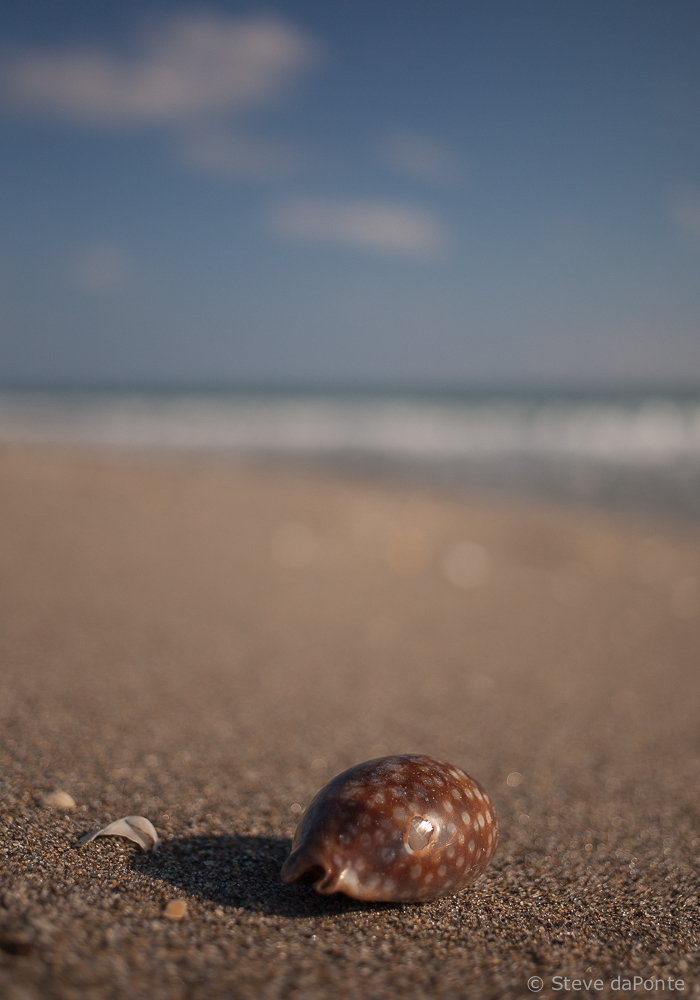
Here are a couple images I shot yesterday using a 40mm prime lens set at f2.8, practicing the techniques that are discussed in:
BOKEH: CREATING WITH SHALLOW DEPTHS EBOOK BY CHRISTOPHER O’DONNELL
Hello LCC members,
This question “what type of photo paper should I print my photo on?” has been asked by many of the members. This opens up a whole set of other questions. The first and most important question is, “what is your intent and vision for the presentation of the image?”.
There is no right or wrong answer to the question only your vision as a photographer can determine what paper or other material it is printed on.
A few words of advice
Note: You should also ask yourself, where (environment) and how (framed or in a photo album) am I going to display the printed image.
POPULAR BASIC TYPES OF PHOTO PAPER
High Gloss
Delivers a “studio finish” with the most vivid colors, an outstanding contrast of light and dark, and high durability. With this finish you may experience glares
in certain lighting situations and fingerprints similar to the glossy finish.
Glossy
Offers tremendous color range, resolution and durability. With this finish you may experience glares in certain lighting situations, fingerprints and are easily scratched. The most practical uses for these Glossy prints are portfolios, photo albums and other displays behind plastic.
Metallic
A metallic finish has a very high gloss, and the colors appear to be quite intense, but in a pleasant way. When you print on its reflective silver surface with color images, the results replicate metallic inks. Or, print black ink and the results are dramatic shades of reflective light. Although normally more expensive, a metallic finish can provide a vibrant “pop” to images. With this finish you may experience glares in certain lighting situations, fingerprints and are easily scratched.
Satin or Semi-Glossy
Offers a great compromise between a Matte and Glossy finish. Helps to reduce issues with glare, dust and fingerprints. Durability (paper weight/ thickness) typically falls right in the middle. Great for your everyday picture frames and ideal for those with a matte border.
Matte
This finish is designed to not show those pesky lighting reflections or fingerprints you often see on glossy prints. With less dynamic range and contrast of colors than all of
the other photo papers. Great for scrapbooking projects, bulletin boards, cards and invitations.
Quick Tip:
Order the various types of photo paper above in the smallest size i.e. 4 x 6 and print your image on each type of paper and see which one suits your vision.
LINKS WITH MORE INFORMATION
Here is a link for more in-depth information about Photo Paper Properties
Links to photo paper sample packs (note: most companies charge a small fee for these sample packs)
Red River Sample Packs – I currently use Red River Paper and it is great!
Epson Photo Papers and Printers – I currently use an Epson Stylus Photo Printer Model R1900 Which has been replaced by the R2880
Canon Photo Papers and Printers
Canson Infinity Fine Art Paper
Kodak Professional Paper and Materials
Injet Comparison, Ratings & reviews from Freestyle Photographic Supplies
Hello LCC members,
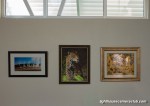
With the upcoming exhibit at the PBSC Eissey Theater here are some helpful tips about frames and mats.
I purchase my frames and mats from Jerry’s Artarama. They have a local store but they stock limited size choices. They also have an in house framing dept that can make custom sizes and cut custom mats.
I have always ordered them online and they typically arrive in about a 7-10 Days. Jerry’s customer service is excellent!
Here are the Links to the Frames and Mats I buy. It is really simple to pick the frame and mat you need for the frame with the handy size charts. Just remember to pick the frame color first then find the size you need for your photo print size i.e 8 x 10, 11 x 14, 13 x19 etc.
Link to the Page with the Frames I use Ambiance Gallery Wood Frames
Link to the Page with the Mats I use Ambiance Conservation Mat Board
-Steve
Hello LLC members,
In three previous posts I covered Aperture (f-stop) , Shutter Speed (Time Value) and ISO (film/digital sensor sensitivity) these are the key settings to obtaining a proper Exposure Value.
But wait, these are also the key settings to creative photography as well. Once you get a handle on the trade-offs when using these settings in combination the creative possibilities are endless.
The simplest way to show this relationship of Aperture, Shutter Speed & ISO is the Exposure Tri-angle

As you can see in this graphic which shows ISO at the top, Shutter speed to the lower left and Aperture lower right. All of them in various combinations influence Exposure Value in the center.
Example:
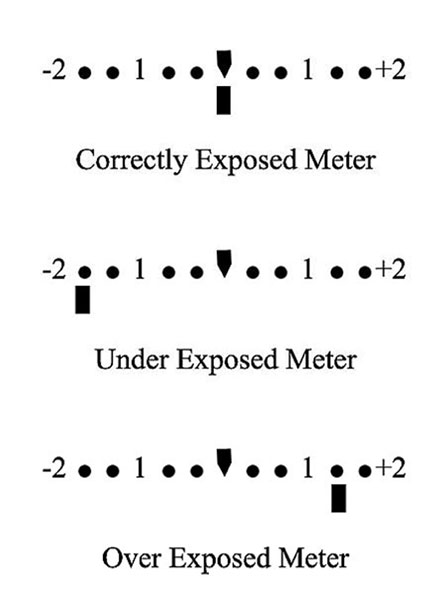
Your ISO is set to 100, Shutter Speed is 1/30 & Aperture is at f/1.8 Your Exposure meter indicates a value of +1
Which is Over Exposed!
So what do you adjust to obtain a proper exposure value of 0 ?
Ah, here is where your creative side steps in, if you want shallow depth like this
you would keep the f/1.8 setting and adjust your shutter speed to?
Yes, that’s it you would raise the shutter speed to about 1/60 ( faster shutter speed = less light is hitting the Digital Sensor ) which should provide a proper exposure.
Ok, is this starting to make sense yet?
Same scene same light ISO 100 , shutter speed 1/30 but instead you want more Depth of Field (Larger f/# = less light entering the lens ) so you set the Aperture to f/4 effectivly cutting the light by 1-Stop and bringing the exposure to 0

This photo is shot at f4 notice how less of the background is blurred and more of the scene is coming into view.
The best way to learn is to put your camera in Manual Mode and play with the settings.
Here is a suggestion:
Put your camera on a tripod in Manual Mode, take some object(s) from around the house put them in different lighting conditions (bright,dim,& dark) and shoot some photos, adjusting only shutter speed, then adjusting only Aperture, then only adjusting ISO so your light meter shows a perfect exposure value ( 0 )
There is one catch:
If the scene is Extremely Under or Over Exposed you may have to adjust two of the three settings to achieve a proper Exposure Value.
I also can suggest a great book by Bryan Peterson ” Understanding Exposure “ which I know for a fact is at the Palm Beach County Library because I have checked it out multiple times myself 🙂
-Steve
Check out my photography site dapontephotography
P.S. Please feel free to leave comments or questions
In two previous posts Aperture and Shutter Speed we the subjects.
The subject for this post is ISO which is the third factor in controling and setting the desired exposure.
What do the ISO i.e. 50,100,200,400,800 etc. numbers mean?
Back in the days of film you had to choose a film speed ASA Now ISO. The number indicated the films rated sensitivity to light. Now in Modern Digital Cameras the roll of film has been replaced by a digital CMOS or CCD Sensor. No more need to change a roll of film to change ISO you simply turn a dial 🙂
In todays digital camera the ISO number indicates the digital sensors sensitivity to light. The only drawback is that when you increase the ISO you decrease the image quality. This is due to digital noise created by the electronics involved. You could compare this to a sound system, you turn the volume up and at a certain point you will get distortion.
In digital photos the noise will slowly introduce a grainy look, if you zoom into a photo shot at high ISO like ISO 1000 something else happens to. The photo will start to have purple splotchy color cast to it. This is digital noise.
That is the trade off when using ISO to increase your ability to capture a handheld shot in low light conditions. So you should first try adjusting your aperture before going for the ISO increase or simply use a tripod.
We will discuss more about the relationship of ISO, Shutter Speed and Aperture in the next post about the Exposure Tri-angle.
Here image examples one at ISO 50, ISO 6400, ISO 25600 shot with a Canon 5D MII & 100mm F2.8 Macro Lens
Hello LCC members,
Today I will talk a bit about aperture (f-stop) AV
This little number that can range between f1.2 – f64 depends on your lens. If you look at your lens it will have this number on the lens as either a fixed value for prime lenses or a variable value for zoom lenses i.e. 3.5 – 6.3 . This number indicates how wide open the aperture can be set.
Remember with aperture the lower the number more light enters the lens the higher the number less light enters the lens. So f1.2 is more light and f22 is less light.
Put most simply – Aperture is ‘the opening in the lens. Moving from one f-stop to the next doubles or halves the size of the amount of opening in your lens (and the amount of light getting through).
Now don’t confuse this with shutter speed we will discuss that in another post as well as the exposure triangle.
Here are some photo examples in which I used a 50mm f1.8 prime lens and my focus was set on the ball of string in the front. The only change I made was to the aperture setting.

This photo is shot at f4 notice how less of the background is blurred and more of the scene is coming into view.

This is shot at f22 which for this lens is the max. Notice that all the items are in clear view from front to back of the image.
Learning how to use the aperture setting is a great way to pull the viewers focus to what you want them to look at. For instance in a portrait a low aperture setting between f1.8 or f8 would be a good choice. In a landscape it would be f16 or f22 as you would want to show the entire landscape.
This week take some photos and just change the aperture setting get out of program mode and take control of your image making. If you do not know how to change the setting this would be a good time to find that camera manual.
Hello LCC members,
It seems like my e-mail lately has been filled with announcements about the newest gear. All of the stuff starts off with the promise of better this or that more features better video etc etc.
But you know what?
Here is the bottom line most every camera on the market today captures high quality images. Why do I say that well it is a fact if Canon,Nikon,Pentax,Sony and the list goes on did not capture great images they would go out of business. That’s right it is a business that has to ride that perpetual circle of more, better and faster.
But, you must ask yourself how much more, better and faster do you really need?
The camera is just a tool like a paintbrush and it is your hands, eyes and brain that make it work. My point here is that in my opinion you are much better off to invest your additional $$$ in books, photo work shops, classes or post processing software.
Much of what I have learned up to this point has been from books and attending photo work shops and various classes.
Some helpful books I can suggest are:
All books by Bryan Peterson many of which are available at the Palm Beach County Library. His books are written in an easy to understand format without getting too technical.
For Black & White photo techniques and processing I can recommend From Oz to Kansas: Almost Every Black and White Conversion Technique Known to Man by Vincent Versace
Books by Scott Kelby are great sources for knowledge and techniques.
Books by Nicole S Young are inspirational and have great tips on improving your photography.
There are lots more great books these are just a few that have been helpful to me in my photographic journey.
” it’s more than just the gear it is also what’s between your ears that can make a great difference in your photography”
~Steve
The short video below will demonstrate the use of color channels. The main focus in this video is Luminance. What is Luminance you ask?
Luminance is defined as
A State or quality of radiating or reflecting light.